
1
Connect GitHub
Sign in with GitHub and authorize QtMesh Cloud to access your repositories.
QtMesh Cloud helps you analyze and monitor the quality of your 3D assets with powerful rules and clear insights.
Catch asset problems before they reach your game.
Sign in with GitHub and authorize QtMesh Cloud to access your repositories.
Select a repository and create your project. We’ll generate a secure ingest token.
Scan through GitHub Actions or upload project files directly from the cloud workspace.
Track validation results, asset metadata, README badges, warnings, and quality trends.
Projects are private by default, access is scoped to your account, and credentials stay revocable.
QtMesh Cloud is becoming a lightweight workspace for models, skeletons, animations, materials, textures, Ogre assets, and PS1 sidecars such as TMD, TIM, RSD, PLY, and MAT.
Start free. Upgrade options are coming as QtMesh Cloud grows.
QtMesh Cloud is built for asset uploads, scan history, badges, and validation workflows. It is not a generic file storage service.
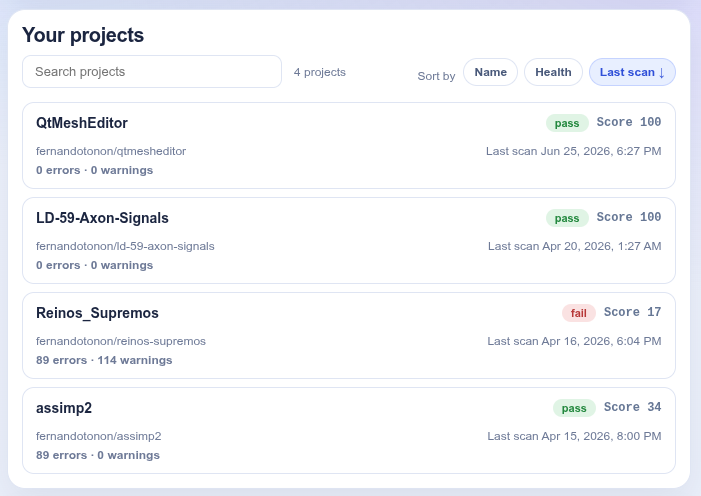
Projects
0 0 activeScans (30d)
0 0 this weekWarnings
0 0 this weekErrors
0 0 this weekUse our GitHub Action to run scans automatically in CI.
Show quality status in your README with dynamic SVG badges.
Consider starring the project on GitHub. It helps other developers discover the tool.
Select a repository or create a project manually.
Public repositories from your GitHub account. Need private repos? Use Create manually and add the repository URL.
Enter a display name and URL-safe slug. Repository URL is optional.
Name and slug are how this project is registered in QtMesh Cloud (under your account). You can edit them; the clone URL comes from the repository you selected above.
You can change these settings later in the project settings.
Save this token to allow your CI to send scan results.
Your project is ready!
Add this to your repository secrets:
GitHub → Settings → Secrets and variables → Actions
| Name | Value |
|---|---|
QTMESH_CLOUD_TOKEN | <paste your token here> |
Add QtMesh scan to your pipeline.
Add the workflow to .github/workflows/qtmesh-scan.yml
Example job — adjust image and install steps for your runner.
.gitlab-ci.yml
Run the QtMesh CLI in CI with your ingest token:
Add a qtmesh.yml in your repo — you can skip this for now.
qtmesh.yml
We’ll analyze your assets after your next push.
We’re waiting for your first scan.
Paste into your repository README. Each line is one badge linking to the app.
Configuration fields and defaults are described in the ScanConfig documentation.
Local override: if the repo has qtmesh.yml, qtmesh.yaml, or qtmesh.json, the CLI uses that file and ignores this cloud configuration.
Create a project first, then configure rules here.
Manage account-level options for QtMesh Cloud.
Apps you've connected to QtMesh Cloud (such as ChatGPT, Claude, or Grok) that can access your projects on your behalf. Revoke any you no longer use. How to connect an assistant →
Loading…
Download a machine-readable copy of the personal data QtMesh Cloud holds about you — your profile, projects, scans, files, connected apps, and feedback.
To confirm, type EXPORT below.
Your gamification data — feature usage, operation metrics (counts only, never your assets), streaks, XP, and achievements. Removing it resets your profile without touching your account, projects, or scans.
Permanently delete your QtMesh Cloud account and all of your data — every project you own, its uploaded assets, scans, findings, tokens, and any connected apps. This cannot be undone.
To confirm, type DELETE below.
Send product feedback, bug reports, or workflow notes to the QtMesh team.
Loading your profile…
Review QtMeshEditor feedback submissions and triage early product signals.
Upload qtmesh scan --json output with your project ingest token (not your login session).
Active tokens are listed by creation time. Values are never shown again after creation—use Regenerate to replace all tokens for a project with a new one (shown once), or Delete to revoke a token without creating a replacement.
Act as you across the whole API (Authorization: Bearer qtm_pat_…) — for scripts, CI and tools, instead of copying your browser session. Values are shown once at creation; revoke anytime. Tokens cannot create or revoke other tokens.